 Auction
 Data Senitization and Its Importance
We produce data all the time, even unwillingly or without intention, in today’s world. All parts of any business process produce some kind of data, such as when an employee sends an email, a customer adds information on a website, finances create invoices or systems log your login. Eventually, this data piles up and expands to laptops, desktops, servers, storage devices and backup systems as well as network equipment. Companies spend lots of money to protect this data while it is live in a system, employing cybersecurity tools, access controls and monitoring for security events. But interest decreases once an IT asset is no longer used. Devices are retired, upgraded, resold, stored or recycled, but much of the data on those devices is left inside. It is in this last phase of the IT lifecycle that some of the most dangerous and little mentioned data security threats surface, so it has become a must for organisations regardless of size.
Many believe that when a device is retired, the risk goes away. Is there any reality here? The answer is NO. It's that the opposite is true far more often than not. Inactive machines tend not to be well looked after. They can lie around in insecure places, can be transferred to third parties, or sold without adequate checks. And if the information on those devices hasn’t been properly wiped, data can be accessed, recovered and abused. That leads to consequences that extend well beyond the IT department and into compliance, reputation, customer confidence, and long-term business existence. It is designed to protect just this scenario by ensuring that data does not continue past the lifetime of the systems on which it was generated.
Understanding What Really Happens to Deleted Data
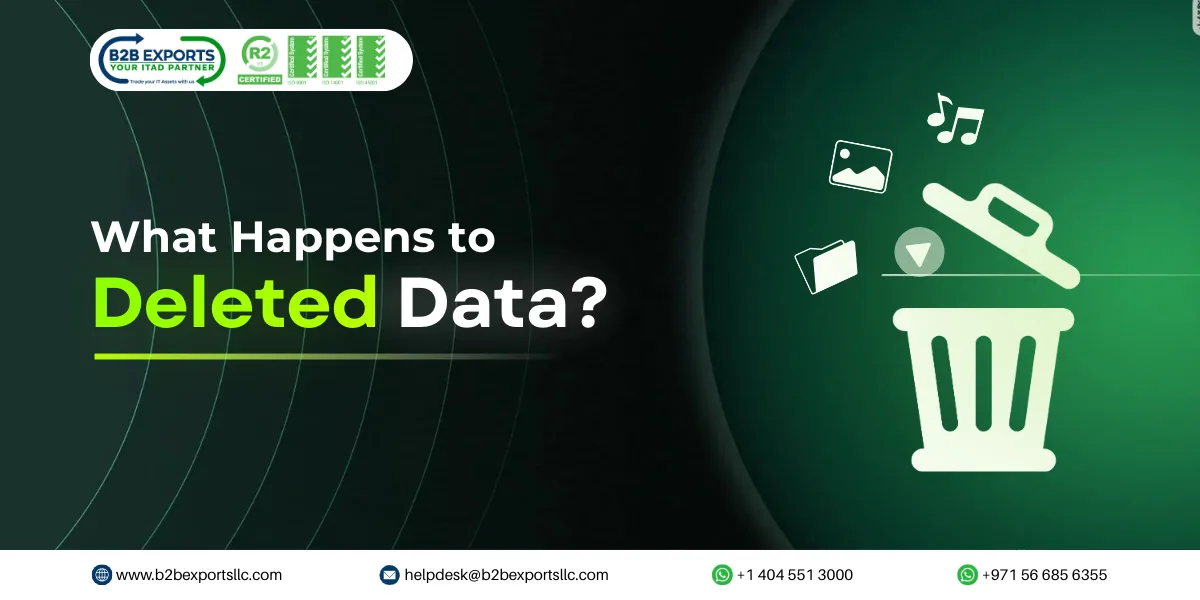
To know more about data sanitization is, it's beneficial to first understand how data gets deleted. Many believe that when a file is deleted, it disappears for good. Many also believe that formatting a drive or resetting a laptop erases everything. Actually, these only hide the data. The data is no longer visible to the system, but it still exists. Until it is overwritten by new data or erased with any specific process. That’s why deleted files can frequently be recovered, even after a device seems empty.
This means that confidential information can remain on devices even once they are no longer used. Everything from customer details, employee records, financial information to email and login data can still be found on old laptops or hard drives. Take a pause, anyone with some basic recovery software can bring this data back. When this happens, the responsibility doesn’t vanish. The company that uploaded the data in the first place still owns the associated personal information. Passing a device on to something else doesn’t take that responsibility away. Data sanitization addresses the need of complete destruction that cannot be recovered.
What Data Sanitization Actually Means in Simple Terms
It simply means removing data permanently so that it can never be recovered again. A few thinks it is about hiding files, locking folders, or making access difficult. But it is a myth. It is about destroying the data permanently, so that no data exists on the device. Even with recovery software or special tools, it it impossible to bring back the data. This is done using proven methods that are specifically designed for permanent data removal. These methods are not experimental or theoretical. They are tested, widely accepted and used every day by organisations that need to protect sensitive information. The main purpose of data sanitisation is simple, it makes sure that no data is left behind when a device is no longer needed.
In real business situations, data sanitization usually comes into the picture when IT equipment reaches the end of its useful life. This usually happens when hardware are upgraded, office is relocated, or when devices are no longer fit for the required standards of daily work. At this stage, organisations have to decide what to do with their IT Assets. Before anything else happens, the data inside the device needs attention. If the data is ignored, the device becomes a risk, even if it is switched off or stored away. One forgotten laptop or hard drive can expose sensitive information and create serious problems. Data sanitization prevents this by ensuring that data is handled properly right at the end, before the device leaves the organisation’s control.
Data Senitization Work Flow
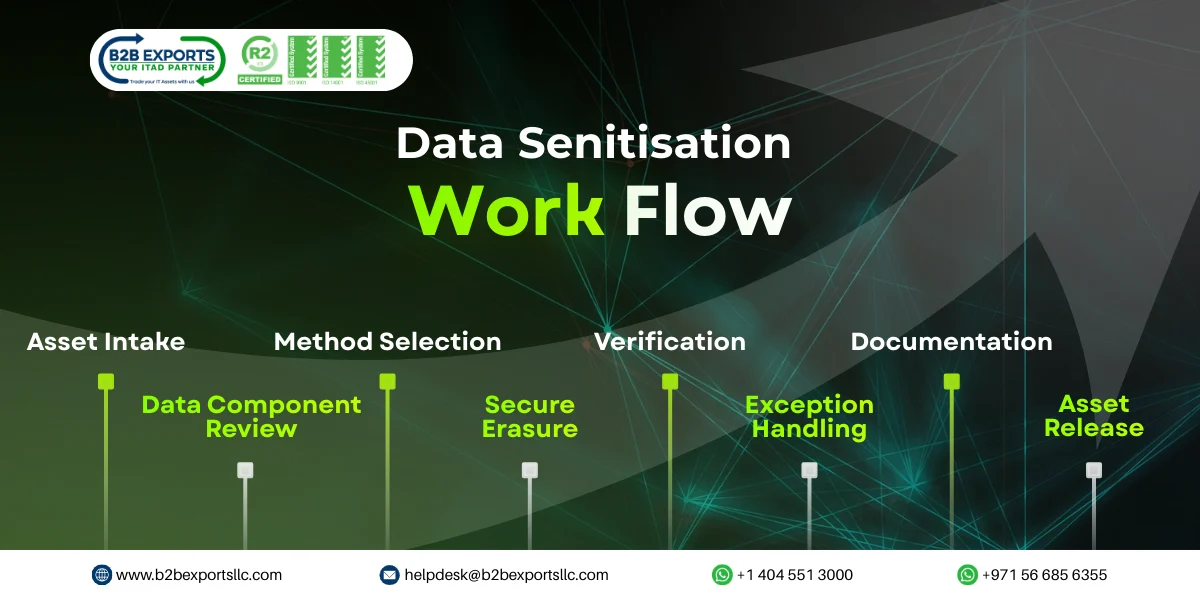
- Asset Intake & Identification: IT assets are checked-in, logged and uniquely identified (asset tag, serial no., device type) to ensure complete trackability through the cleanse process.
- Data Bearing Component Review: Data bearing devices and media, such as HDDs, SSDs, flash drives or on-board memory are identified for potential sanitisation based on device type and data sensitivity.
- Selection of method: Select an appropriate sanitization method either software based data erasure, cryptographic erase, degaussing, or Data Destruction in accordance with standards such as NIST, ISO, or customer-specific requirements.
- Secure Data Erasure:Utilization of approved tools and pre-determined, monitored processes to overwrite/delete the data making it unrecoverable from storage media.
- Verification & Validation: Verification takes place following erasure, either through automated reports or manual validation as required for system checked and verification that effective data removal has taken place.
- Exception Handling (If Erasure Fails): Media that does not pass sanitisation is isolated and physically destroyed to ensure data does not remain at risk.
- Documentation & Certification: Comprehensive audit logs and Certificates of Data Sanitisation/Destruction are produced to demonstrate compliance and facilitate regulatory audits.
- Asset Release: Sanitised assets are approved and released for refurbishment, resale, redeployment, or environmentally compliant disposal as necessary.
Why Data Sanitisation Is So Important for Businesses?
Many data breaches are not caused by hackers breaking into systems. They happen because someone overlooked an old device. A laptop sold online, server sent for recycling or any hard drive left in storage as garbage. These situations are very common and they are also preventable. But still, it continues to cause major data exposure incidents. There are also legal and regulatory reasons why it cannot be ignored. Data protection laws require businesses to protect personal and sensitive data throughout its entire lifecycle. This responsibility does not end with the retirement of IT Assets because if the data leaks due to the poor disposal practice, the organisation will have to face fines, legal action, and audit failures. These consequences often cost far more than proper sanitisation would have. Beyond compliance, there is the issue of trust. Customers share their data with the expectation that it will be handled responsibly. Business partners do the same. When that trust is broken, it is difficult to recover. One incident involving exposed data can damage a reputation permanently. So, it plays a quiet but essential role in protecting that trust.
How Data Sanitisation Is Done in the Real World?
This process is not that hard, but it has to be done right. Traditionally, the data discovery process begins by determining what devices have data. That includes computers, servers, storage drives, backup systems and sometimes equipment people overlook. After that, the data type of each device is determined. Certain data is more sensitive than others. The suitable one is then selected on this basis. Typical strategies include: overwriting data in a way that ensures it cannot be retrieved, destroying encryption keys, rendering the data unreadable or when there are no plans to reuse media physically destroying storage media. Each method has its place. The level of data destruction must be aligned with the associated risk. Devices are checked again after the data is deleted. This verification checks that nothing is retrievable. Reports and certificates are subsequently generated. These records are important. They serve as evidence of doing sanitisation right and are used as evidence during audits or inspections.
How Data Sanitisation Fits into IT Asset Management?
IT Asset Management is about looking after equipment from the day it is purchased until the day it is no longer used. This includes tracking devices, maintaining them, and eventually retiring them. Data sanitisation becomes most important at this final stage. Without it, all the security steps taken during the life of the asset lose their value once the device leaves active use. By making it a standard part of asset retirement, organisations reduce risk and gain better control over their IT assets. It ensures that devices are closed out properly and that the data inside them is handled responsibly right until the very end.
Role of Data Sanitisation in IT Asset Disposal
IT Asset Disposal is all about deciding what to do with old or retired IT Assets. Some are reused, some are sold, others are recycled, and a few are destroyed too. But no matter which option you choose, it’s not fully safe until the data is stored inside the IT Assets is still there. That’s why data wiping or data cleaning properly is very important in the disposal process. Most of the companies prefer to work with certified and specialized ITAD providers, who are certified to handle the process in the right way. Certified providers follow strict rules for data security, eco-friendly recycling and keeping proper records. Standards like R2v3 make sure these rules are followed consistently throughout the process, not just sometimes. Working with certified ITAD partners, organizations help to avoid mistakes, reduce confusion and feel confident that their data remains safe even after the Assets leave their hands.
Compliance, Audits, and the Need for Proof
Doing Data Sanitisation alone is not enough for organisations today. It is equally important to prove that it was done properly. Regulators and auditors do not rely on verbal confirmation or assumptions. They expect clear evidence. This is where sanitisation reports and certificates become important. These documents show when the data was removed, how it was removed and which asset was involved. Without proper documentation, even devices that were erased correctly can still create compliance problems. Missing records can result unnecessary risk during the audit process. Verifiable and organised sanitisation documentation helps safeguard organisations during inspections and audits. But it also suggests that data is treated with respect, not casually, even when devices have been retired.
Environmental Benefits of Proper Data Sanitisation
Data sanitisation also helps the environment in a very simple way. When data is removed correctly, companies do not need to break or destroy devices just because they are worried about data. Old laptops, computers, and servers can still be used again. They can be reused inside the company, refurbished, or passed on safely. This means fewer devices are thrown away as electronic waste. When fewer devices are thrown away, fewer new devices need to be made. This saves raw materials, electricity, and fuel. It also reduces pollution caused by manufacturing and disposal. Recycling also becomes safer because sanitised devices can be handled without any data risk. In short, it helps companies protect data and reduce waste at the same time, without making things complicated.
Financial Benefits and Value Recovery
It is not only about safety. It also helps organisations manage their money better. When data is removed properly, old devices do not have to be thrown away just because they once stored information. Laptops, computers, servers, and hard drives can still be used again or sold safely. It means that organisations can get some value returned from their Assets they have already paid for. Eventually, this decreases your need to keep purchasing new devices over and again. That alone helps to reduce IT costs. Meanwhile, data sanitisation also prevents organisations from costly troubles. Breach of data, regulatory fines can be expensive and can create long-term damage. Many of these problems start with one poorly handled device. When it is done correctly, these risks are avoided. When you look at the full picture, it is not just a security step. It helps save money, protects existing investments, and prevents losses that are much harder to fix later.
Common Data Sanitisation Mistakes to Avoid
Lots of companies make simple mistakes when dealing with data sanitisation, and most of the time this happens without realising the risk. They often assume that basic steps are enough or they rush through the process because the Assets are already retired. When old laptops, servers or hard drives are removed, the focus quickly moves to new equipment. The data left inside the old IT Assets is forgotten. This is how problems start. These small mistakes can slowly turn into serious data exposure if they are not noticed in time. Small mistakes that lead to bigger problems are:
- Thinking that deleting files or formatting a device is enough, even though the data is still there.
- Letting staff reset devices on their own, without any proper checks.
- Not checking the device after sanitisation, so there is no clear proof.
- Not keeping reports or records, which causes trouble during audits.
- Using disposal or recycling vendors without certification, with no clear data security process.
- Forgetting about other data-holding devices, such as backup drives or external storage.
- Handling sanitisation differently each time, instead of following one clear method.
Conclusion: Why Data Sanitisation Truly Matters
It is not an extra step and also something organisations can ignore. The companies that generate, store or use data are responsible for ensuring its safety until point of disposal. This responsibility doesn't end when a laptop is replaced or a server is powered down, because there is still data on those devices if it isn't removed correctly. As companies expand and technology continues to evolve, old IT Assets are retired more often. Each retired device carries data with it. If that data is not dealt with, it becomes a risk. Over time, these small ignored risks turn into serious problems. Data sanitisation is there to prevent this from happening. It makes sure that sensitive information is not left behind when Assets are no longer needed.
Switching the mindset from data sanitisation as a burden to treating it as a normal part of ITAM and ITAD. It reduces the risk of data breach as well as non-compliance, while maintaining trust with customers. Proper sanitisation also allows Assets to be reused or recycled safely, instead of being destroyed. This is good for the environment and helps recover value from IT assets. Most importantly, it ensures that data does not remain accessible after a device leaves active use. In simple words, data security does not end when a system is replaced or stored away. It ends when the data inside it is completely destroyed. Data Sanitisation makes sure this final step is done properly without any risk.
Frequently Asked Questions (FAQs)
- What is Data Sanitisation?
Data Sanitisation means erasing whole data from a device so it can never be recovered. It is different from deleting or formatting.
- Is deleting or factory reset enough?
No. Deleting or resetting only hides the data. The data usually stays on the device and can be recovered with specific tools.
- How is Data Sanitisation done?
It is done by several techniques like overwriting data, destroying encryption keys or physically destroying the drive, depending on the situation.
- How do I know data is really gone?
After Data Sanitisation, a verification check and report confirm that no data can be recovered.
- Why should businesses care about Data Sanitisation?
Because old devices can leak sensitive or important data. Data Sanitisation helps avoid data breaches, legal trouble, and loss of trust.